
I bought my first iPhone, an SE, in 2016. Ten years later my library holds 23,227 photos and videos, and every one of them has a GPS position attached. In 2024 I gave up my fixed address and started living on the road: more than a hundred cities in two years, a handful of them for a month or longer.
At some point I wanted a simple answer to a simple question: where have I actually been? The answer was already sitting in my camera roll. Getting it out turned out to be harder than I expected, and I've spent the last couple of years on it, first for myself and then as an app. This is what I learned.
First, check that your photos know where they were taken
None of this works without location data, so it's worth a minute to check. In Settings → Privacy & Security → Location Services → Camera, choose While Using the App, and leave Precise Location on. Without it, pins can land a few kilometres from where you stood.
Then open an old travel photo in Photos and swipe up. If there's a small map with a place name under the picture, you're fine.
Some photos will never have a location. Pictures from most mirrorless and DSLR cameras don't, because the camera has no GPS. Images saved from the web don't, and neither do many photos that came to you through a messaging app, since those apps tend to strip the metadata. Screenshots are usually useless too. I'll come back to the camera problem at the end, because it was one of mine.
The Map in Apple Photos
The quickest way to see your photos on a map is already on your phone. In iOS 26 it moved: open Photos, scroll down to Collections, and you'll find Map under Utilities. Pin it if you plan to come back.
Zoomed out, it shows clusters of thumbnails over everywhere you've taken pictures. Tap one to see the photos from that spot.
It's a good way to browse, and for "where did I take this?" it's all you need. What it can't do is give you a list. There's a cluster over Portugal, but nothing on the screen says how many countries you've been to, or which ones, or when. There's no way to look at March 2024 and see where you were. And photos taken from a plane window sit in the middle of whatever country you were flying over, indistinguishable from the rest (more on that below).
Visited Places in Apple Maps
iOS 26 also added Visited Places to Apple Maps. The name makes it sound like the same thing, but it's a different idea: Maps keeps a record of places you go using your phone's location in the background. It doesn't look at your photos.
That's useful from the day you switch it on. It just can't see anything before that day, so it won't help with the trip you took in 2019. For the years before, your photos are still the best record you have.
Building the full picture: C Journey
I've been writing software for more than ten years, mostly web apps. When neither of the options above answered my question, I built the thing I wanted. That's C Journey, so read this part knowing I'm the one who made it.
It reads the time and location of every photo and video in your library and turns them into a map, a trip calendar, and a count of the countries, cities and places you've been. Setting it up is short: install it (iPhone, iOS 17 or later), allow access to all photos rather than a selection, and let the first scan run. It only reads metadata on the phone, so even a big library is done in a few minutes.
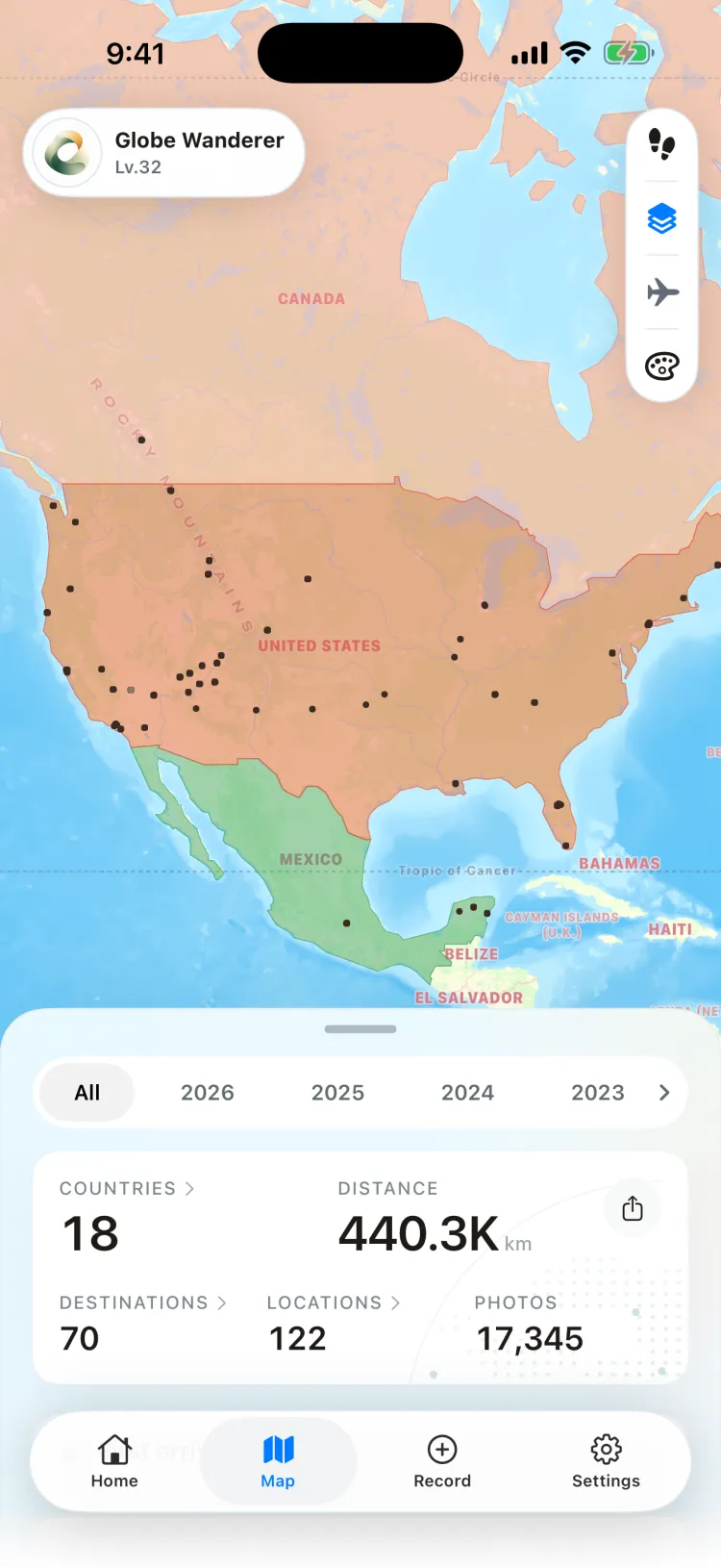
What I wanted, and what the Photos map doesn't give you:
- a real list and count of countries and cities, and where possible the actual place: the museum, the national park, the airport, rather than just "France"
- a calendar where I can pick a day or a month and see where I was and how long I stayed, which matters a lot when you move every few weeks
- plane photos kept out of the count (the next section is the story behind that)
You can also pull in flights from apps like Flighty and myFlightradar24, so the routes between cities show up too.
On privacy: original photos and videos never leave the phone. Thumbnails, previews and most of the processing happen on the device. The app does look up place names from coordinates, and if you turn on iCloud Backup, the travel records go to your own iCloud account rather than to my server.
Downloading it and scanning everything is free, and so is the all-time map with every country you've visited. This year and last year are free to browse in detail. Pro unlocks older years one by one, plus extras such as more map colours, longer stay tracking and more backup versions.
How I "visited" Kazakhstan
The first time the app finished scanning my own library, Kazakhstan was on the list. I've never been to Kazakhstan. I had flown over it, though, and taken a few pictures out of the window. A photo's GPS position is the point on the ground directly below the plane, so as far as the data was concerned, I'd been there.
My first fix was an altitude cutoff: anything recorded above a certain height counts as taken in the air. It broke almost immediately, in both directions. Plenty of window photos are taken during takeoff and landing, when the plane is only one or two thousand metres up. Meanwhile there are cities sitting above 2,000 metres, and people take photos on mountain summits far higher than that. A single number can't separate a hiker on a 4,000 m pass from a passenger at 4,000 m.
What finally worked was comparing two altitudes instead of one. For each photo, the app looks up how high the ground is at that exact spot, using terrain elevation data, and compares it with the altitude the phone recorded. On a mountain the two are close. On a plane the gap is huge. Today a photo counts as taken in flight when it's more than 1,000 m above the ground beneath it, or above 8,900 m, which is higher than any mountain. Those photos go into a separate Flight Photos list and don't count as visits. A few still slip through, mostly low shots right before landing, and you can hide those from a place's photo list.
Getting location back for camera photos
The other gap was my own camera. When I go out with it, I usually have my phone in my pocket too, and the phone takes a picture or two along the way. If the camera shot something at 3:12 pm and the phone took a photo at 3:20 pm, they were almost certainly taken close together. So the first version of the fix worked out each camera photo's position from phone photos taken within two hours of it.
That's decent, but it depends on how often you happened to use the phone. Later I added track recording: the app can log where you go during the day, and with a continuous track, filling in camera photos becomes much more precise. It's in Settings → Data → Photos Without Location, where you can pick a single photo and drop it on the map, or select a batch and let the app detect the locations, with a preview before anything is saved.
If you shoot with a newer camera, check its companion app as well. Sony, Canon, Nikon and Fujifilm all have one that can borrow your phone's GPS over Bluetooth, so new photos carry a location from the start.
And for the trips with no photos at all, there's the low-tech option: check in on the spot, or add a destination by hand, even a stay of several days in one go.
Which one to use
| Apple Photos Map | C Journey | |
|---|---|---|
| Works from your existing photos | Yes | Yes |
| Covers past years | Yes | Yes |
| List and count of countries and cities | No | Yes |
| Trip calendar and stay length | No | Yes |
| Separates photos taken from a plane | No | Yes |
| Fills in locations for camera photos | No | Yes |
| Cost | Free | Free, with optional Pro |
Visited Places in Apple Maps isn't in the table because it answers a different question: it records where you go from the day you turn it on, without looking at your photos.
If you only want to look at your photos on a map, Apple Photos already does that. If you want a log from today onwards, turn on Visited Places. If, like me, you want to know every place you've been over the last ten years, with dates, the photos already have the answer. You just need something that reads all of them.
Dust has been writing software for more than ten years and living on the road since 2024. C Journey started as a way to answer one question from 23,227 photos: where have I actually been?